For golf resorts
Golf resorts: sell the course before check-in
A 3D course map and flyover footage that do the work of destination marketing, from the first ad to the pre-arrival email.
For a golf resort, the course is rarely the only thing on sale. It is part of a stay: rooms, food, spa, a setting. But for golfers it is often the reason they pick one destination over another. They want to know what they are flying in for. A 3D course map answers that better than a gallery of photographs, and it does it weeks before the guest arrives.
Destination golf works on anticipation. Guests book months ahead and spend the time in between thinking about the trip. Anything that feeds that, such as a hole they can fly, a famous green they can study or a clip they can send to their group, keeps the booking warm and the excitement up.
The guest journey, hole by hole
Here is where an immersive course map fits in a typical resort guest's path from first look to return visit.
- 01
Dreaming
A flyover clip in a social ad or destination video shows the setting: sea, mountains, forest, light. This is where the course earns a second look.
- 02
Comparing
On your resort website, the interactive 3D map lets a golfer explore every hole. They compare it with the other resorts on their shortlist, which usually offer photos.
- 03
Booking
The map or a short clip sits next to the golf package, so the course is in view at the moment of decision.
- 04
Before arrival
The confirmation and pre-arrival emails link to the map. Guests plan their rounds, talk about the signature holes and arrive excited.
- 05
On site
Flyover loops play in the lobby, the golf shop and the bar. A lighter course guide with GPS helps guests find their way on the day.
- 06
After the trip
Guests share the map with friends planning their own trip. The course becomes the thing they tell people about.
Destination marketing that shows the land
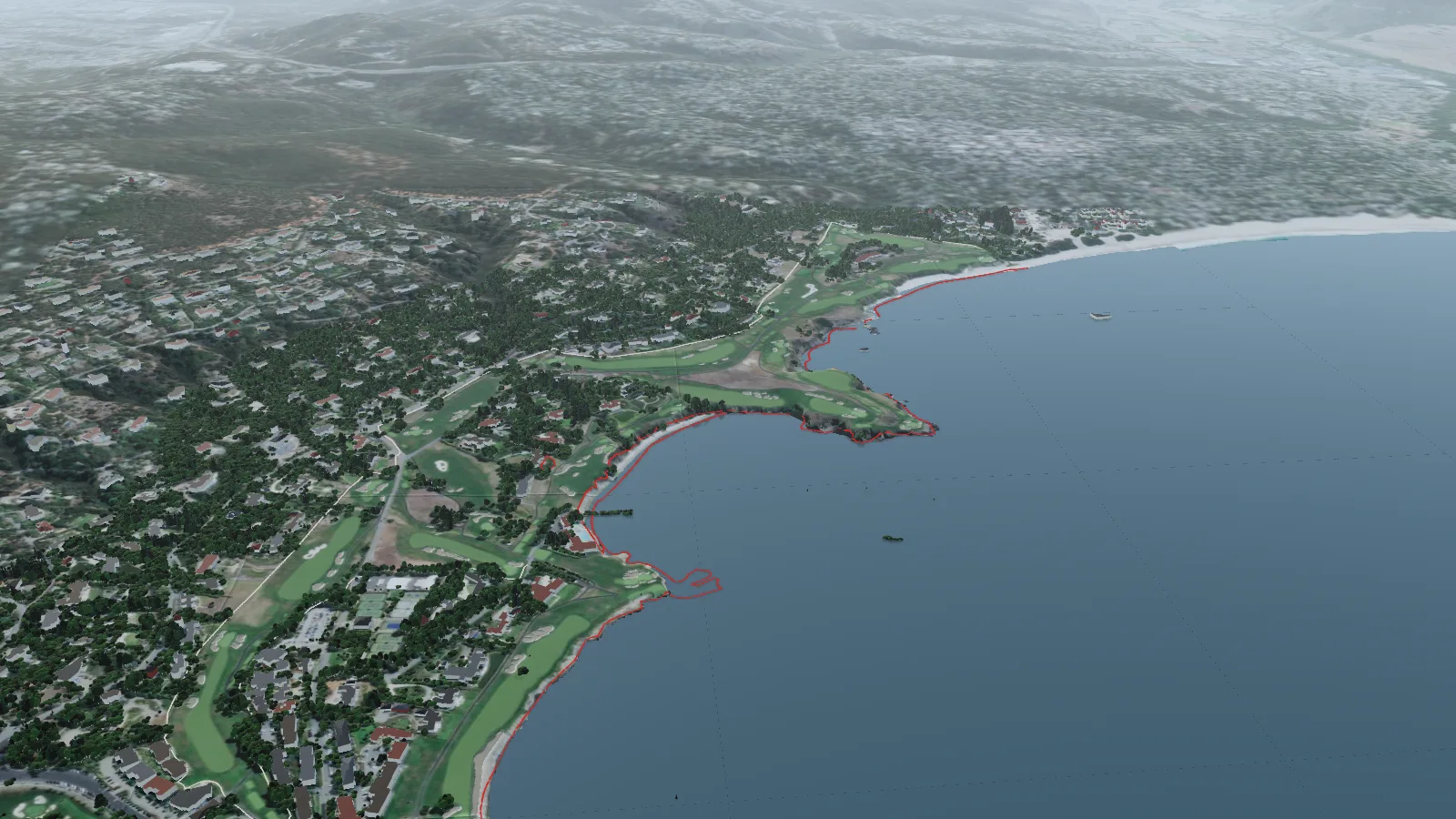
Resort marketing leans on scenery. Sea cliffs, mountain backdrops and old forest are what sell the trip. A 3D map built from LiDAR and satellite imagery keeps that scenery around every hole, so a golfer sees the course and its setting together. Take Pebble Beach: the 7th sits on a rocky point into Carmel Bay, and the 18th bends along the sea wall towards the Lodge. Flying those holes in 3D sells the place in a way a scorecard never could.
Lighting helps too. Switch the map to Golden hour or Dusk and the course looks the way it does in the brochure. Those same lighting modes are used for flyover video clips, which your team can cut into ads, reels and destination films.
The pre-arrival email
Pre-arrival emails are often an afterthought: directions, check-in time, a spa upsell. Adding "Fly the course before you arrive" with a link to the map gives guests a reason to open it and click. Golfers plan their strategy on the signature holes and forward the link to their playing partners. The trip starts earlier, and the golf becomes the story of it.
On site: from showpiece to practical guide
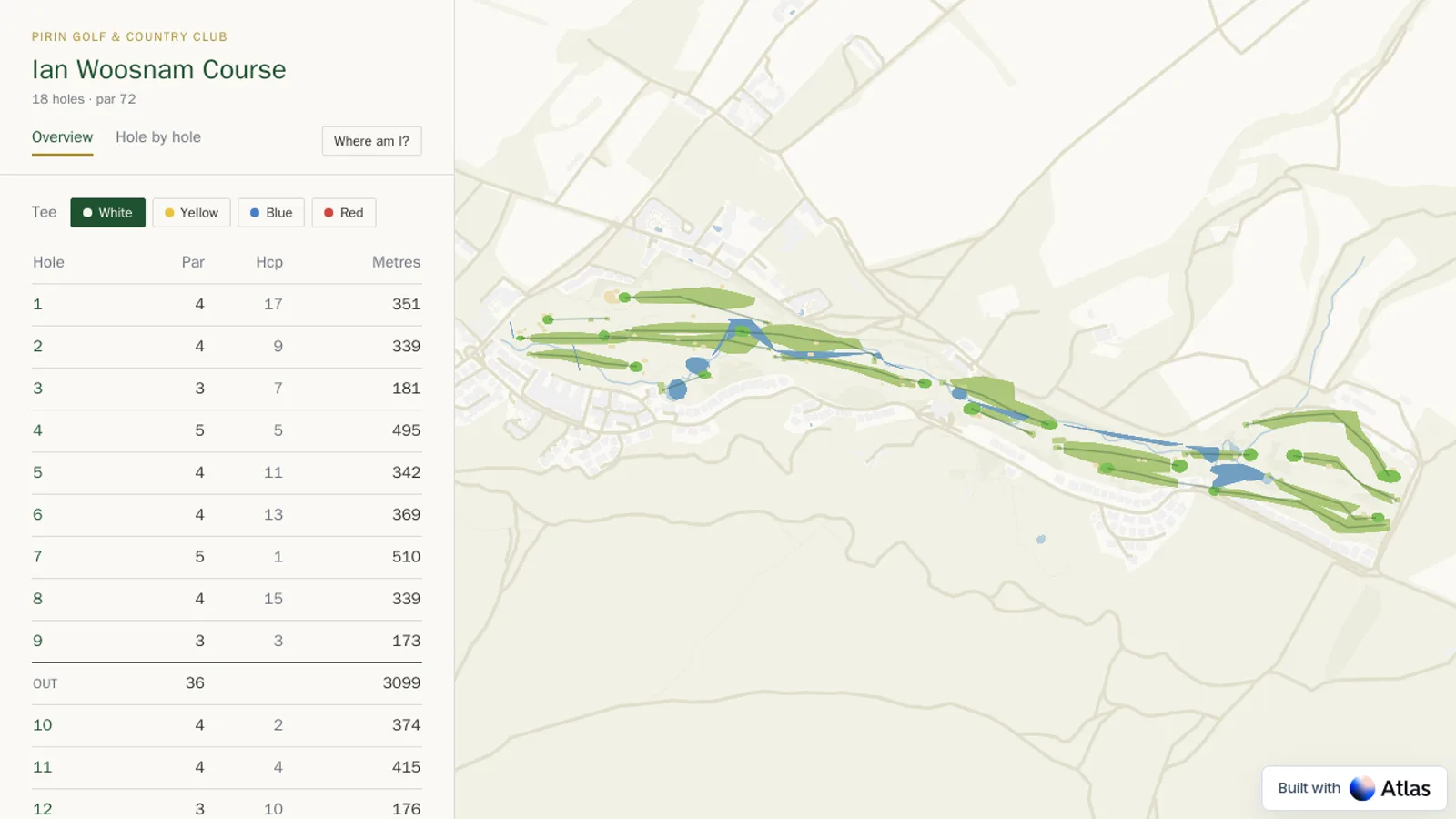
Once guests arrive, their needs change. They want to know where the 1st tee is and how long the 7th plays from the white tees. That is where a lighter interactive course guide earns its place, with a scorecard by tee, a hole-by-hole view and "Where am I?" GPS on the phone. See it live at Pirin Golf & Country Club, a mountain resort course in Bulgaria.
Flyover loops also work well on screens around the resort: the lobby, the golf shop, the bar after the round.
Simple for the resort team
Your marketing team does not need new software. We build the course from public data and your course information, and you get one line of embed code for each course plus the flyover clips. Put the map on the golf page, the booking page and any partner site that accepts an iframe. Our embed guide covers the common website platforms.
If real estate is part of the resort, the same map can show villas and plots in relation to the fairways. That angle is covered on our page for golf real estate.
FAQ
For resorts, answered
We have more than one course. Can you map them all?
Can we use the flyover footage in our own destination video?
Will the map work on travel partner or tour operator sites?
Do guests need an app on site?
Can the map show hotel buildings and villas?
Let guests fly in before they fly in.
Send us the name of your course. We build it in 3D from LiDAR and imagery, and you paste one line of code into your website.